High Availability MySQL Kubernetes Using Percona Operator
Overview
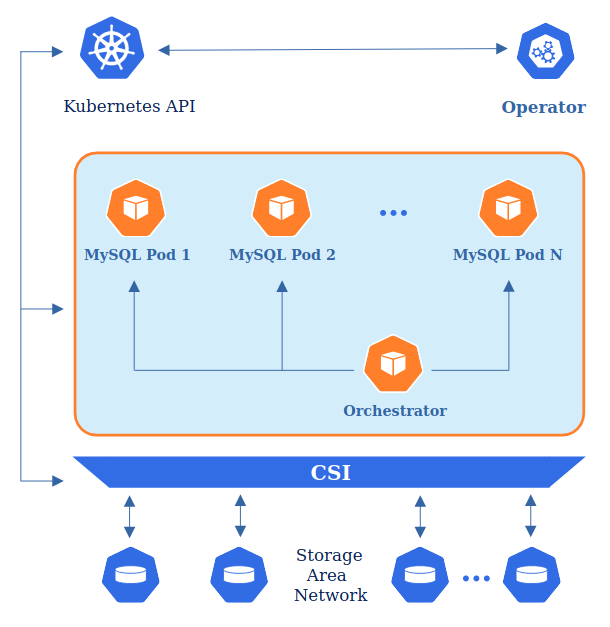
The Percona Distribution for MySQL Operator automates and simplifies deploying and managing open source MySQL clusters on Kubernetes.
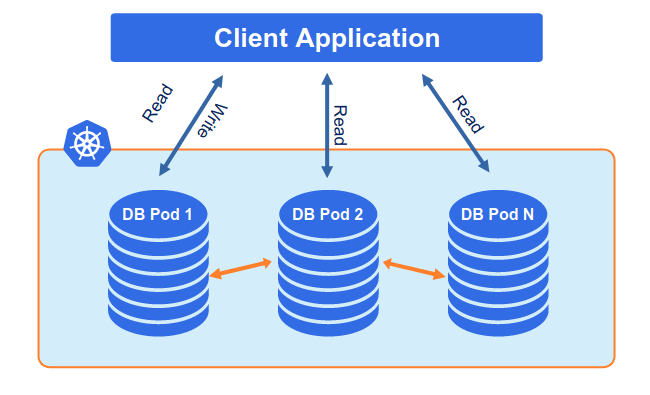
To provide high availability operator uses node affinity to run Percona Server for MySQL instances on separate worker nodes if possible. If some node fails, the pod with it is automatically re-created on another node.
Prerequirement
- Kubernetes cluster with at least 3 nodes
Setup MySQL Cluster
Clone Percona Server MySQL Operator repository :
git clone -b v0.1.0 https://github.com/percona/percona-server-mysql-operator
cd percona-server-mysql-operator/deploy
Create CRD, RBAC, and Operator :
kubectl apply -f crd.yaml -f rbac.yaml -f operator.yaml
Then, apply the secret configuration for MySQL cluster :
kubectl apply -f secrets.yaml
Edit cr.yaml.
from this :
mysql:
  image: percona/percona-server:8.0.25
  imagePullPolicy: Always
to this :
mysql:
  image: percona/percona-server:8.0.26
  imagePullPolicy: Always
After editing is finished, deploy the cluster using the following command :
kubectl apply -f cr.yaml
Wait a while until all pods are created :
$ kubectl get pod
NAME                                            READY   STATUS    RESTARTS   AGE
cluster1-mysql-0                                1/1     Running   1          19m
cluster1-mysql-1                                1/1     Running   0          64m
cluster1-mysql-2                                1/1     Running   0          30m
cluster1-orc-0                                  2/2     Running   0          19m
percona-server-mysql-operator-b748f485b-2c2zf   1/1     Running   0          19m
To see which pod is the MySQL master, run the following command :
kubectl get pod -l mysql.percona.com/primary=true

To see which pod are the MySQL slave, run the following command :
kubectl run --rm -it percona-client --image=percona:8.0 --restart=Never \
-- mysql -h cluster1-mysql-primary -uroot -proot_password -e "show slave hosts"

Testing MySQL Cluster
Testing data sync between Master & Slave
Create test database to MySQL master :
kubectl run --rm -it percona-client --image=percona:8.0 --restart=Never \
-- mysql -h cluster1-mysql-primary -uroot -proot_password -e "create database test"
Make sure the test database is also created on first MySQL Slave :
kubectl run --rm -it percona-client --image=percona:8.0 --restart=Never \
-- mysql -h cluster1-mysql-1.cluster1-mysql -uroot -proot_password -e "show databases"
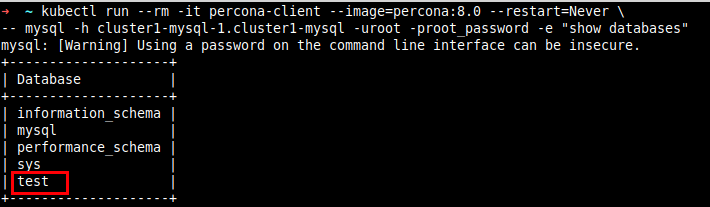
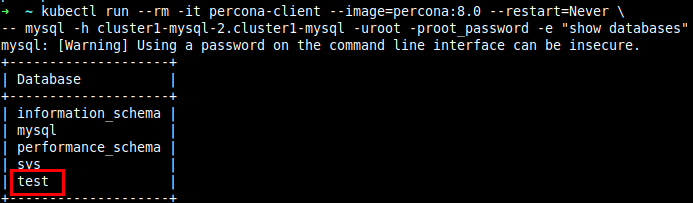
Make sure the test database is also created on second MySQL Slave :
kubectl run --rm -it percona-client --image=percona:8.0 --restart=Never \
-- mysql -h cluster1-mysql-2.cluster1-mysql -uroot -proot_password -e "show databases"
Setup ProxySQL
Create a file called proxysql.yaml and add the following lines :
apiVersion: v1
kind: ConfigMap
metadata:
  name: proxysql-configmap
data:
  proxysql.cnf: |-
    datadir="/var/lib/proxysql"
    admin_variables=
    {
            admin_credentials="admin:admin;radmin:radmin"
            mysql_ifaces="0.0.0.0:6032"
            refresh_interval=2000
            hash_passwords=false
    }
    mysql_variables=
    {
            hash_passwords=false
            threads=4
            max_connections=2048
            default_query_delay=0
            default_query_timeout=36000000
            have_compress=true
            poll_timeout=2000
            interfaces="0.0.0.0:6033;/tmp/proxysql.sock"
            default_schema="information_schema"
            stacksize=1048576
            server_version="5.1.30"
            connect_timeout_server=10000
            monitor_history=60000
            monitor_connect_interval=200000
            monitor_ping_interval=200000
            ping_interval_server_msec=10000
            ping_timeout_server=200
            commands_stats=true
            sessions_sort=true
            monitor_username="root"
            monitor_password="root_password"
    }
    mysql_servers =
    (
            { address="cluster1-mysql-primary" , port=3306 , hostgroup=10, max_connections=100 },
            { address="cluster1-mysql-0.cluster1-mysql" , port=3306 , hostgroup=20, max_connections=100 },
            { address="cluster1-mysql-1.cluster1-mysql" , port=3306 , hostgroup=20, max_connections=100 },
            { address="cluster1-mysql-2.cluster1-mysql" , port=3306 , hostgroup=20, max_connections=100 }
    )
    mysql_users =
    (
            { username = "root" , password = "root_password"}
    )
    mysql_query_rules =
    (
            {
                    rule_id=100
                    active=1
                    match_pattern="^SELECT .* FOR UPDATE"
                    destination_hostgroup=10
                    apply=1
            },
            {
                    rule_id=200
                    active=1
                    match_pattern="^SELECT .*"
                    destination_hostgroup=20
                    apply=1
            },
            {
                    rule_id=300
                    active=1
                    match_pattern=".*"
                    destination_hostgroup=10
                    apply=1
            }
    )

---
apiVersion: apps/v1
kind: Deployment
metadata:
  name: proxysql
  labels:
    app: proxysql
spec:
  replicas: 1
  selector:
    matchLabels:
      app: proxysql
      tier: frontend
  strategy:
    type: RollingUpdate
  template:
    metadata:
      labels:
        app: proxysql
        tier: frontend
    spec:
      restartPolicy: Always
      containers:
        - image: proxysql/proxysql:2.3.2
          name: proxysql
          volumeMounts:
            - name: proxysql-config
              mountPath: /etc/proxysql.cnf
              subPath: proxysql.cnf
          ports:
            - containerPort: 6033
              name: proxysql-mysql
            - containerPort: 6032
              name: proxysql-admin
            - containerPort: 6080
              name: proxysql-web
      volumes:
        - name: proxysql-config
          configMap:
            name: proxysql-configmap
---
apiVersion: v1
kind: Service
metadata:
  name: proxysql
  labels:
    app: proxysql
    tier: frontend
spec:
  type: ClusterIP
  ports:
    - port: 6033
      name: proxysql-mysql
    - port: 6032
      name: proxysql-admin
  selector:
    app: proxysql
    tier: frontend
Deploy proxysql.yamlusing the following command :
kubectl apply -f proxysql.yaml
Testing ProxySQL
Run a MySQL write query to ProxySQL to create database named “test1” :
kubectl run -it --rm percona-client --image=percona:8.0 --restart=Never \
-- mysql -h proxysql -P6033 -uroot -proot_password -e "create database test1"
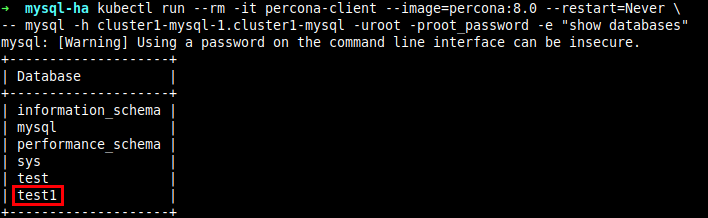
Make sure that database is successfully created on the first MySQL Slave :
kubectl run --rm -it percona-client --image=percona:8.0 --restart=Never \
-- mysql -h cluster1-mysql-1.cluster1-mysql -uroot -proot_password -e "show databases"
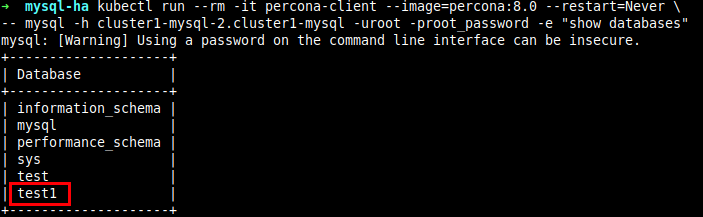
Make sure that database is also successfully created on the second MySQL Slave :
kubectl run --rm -it percona-client --image=percona:8.0 --restart=Never \
-- mysql -h cluster1-mysql-2.cluster1-mysql -uroot -proot_password -e "show databases"
High availability testing
Delete pod that is the MySQL Master using the following command :
kubectl delete pod/cluster1-mysql-0
Wait a minute, then make sure that now the MySQL master has changed to another pod :
kubectl get pod -l mysql.percona.com/primary=true

Make sure that now the MySQL slave has changed to mysql-0 and mysql-2 because the MySQL master pod is mysql-1 :
kubectl run --rm -it percona-client --image=percona:8.0 --restart=Never \
-- mysql -h cluster1-mysql-primary -uroot -proot_password -e "show slave hosts"

References
https://www.percona.com/doc/kubernetes-operator-for-mysql/ps/kubernetes.html
https://severalnines.com/database-blog/running-proxysql-kubernetes-service