High Availability MySQL on Kubernetes Using Percona XtraDB Cluster
Overview
The design of the Operator is highly bound to the Percona XtraDB Cluster high availability implementation, which in its turn can be briefly described with the following diagram.
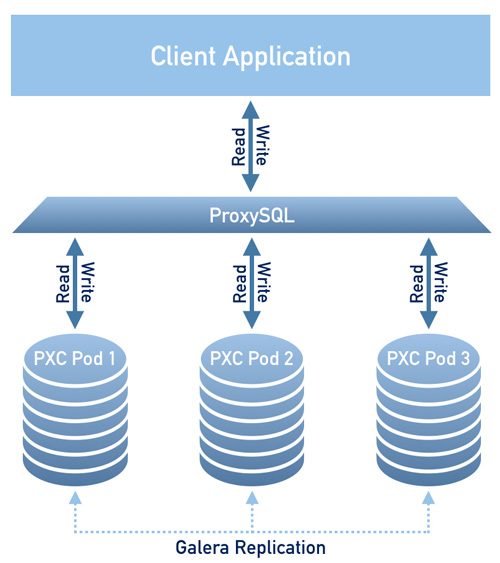
Being a regular MySQL Server instance, each node contains the same set of data synchronized accross nodes. The recommended configuration is to have at least 3 nodes. In a basic setup with this amount of nodes, Percona XtraDB Cluster provides high availability, continuing to function if you take any of the nodes down. Additionally load balancing can be achieved with the ProxySQL daemon, which accepts incoming traffic from MySQL clients and forwards it to backend MySQL servers.
To provide high availability operator uses node affinity to run Percona XtraDB Cluster instances on separate worker nodes if possible. If some node fails, the pod with it is automatically re-created on another node.
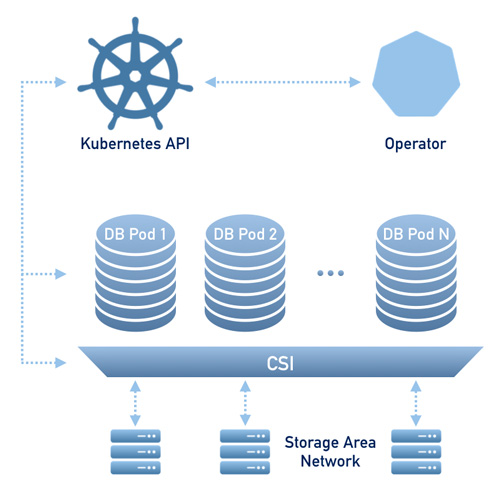
To provide data storage for stateful applications, Kubernetes uses Persistent Volumes. A PersistentVolumeClaim (PVC) is used to implement the automatic storage provisioning to pods. If a failure occurs, the Container Storage Interface (CSI) should be able to re-mount storage on a different node. The PVC StorageClass must support this feature (Kubernetes and OpenShift support this in versions 1.9 and 3.9 respectively).
Prerequirement
- Kubernetes cluster with at least 3 nodes
Configuration
Clone the percona-xtradb-cluster-operator repository :
git clone -b v1.10.0 https://github.com/percona/percona-xtradb-cluster-operator
cd percona-xtradb-cluster-operator/deploy
Apply the file that containts custom resource definition, RBAC, and operator configuration :
kubectl apply -f bundle.yaml
Now, make sure the operator is running
$ kubectl get pod
NAME                                               READY   STATUS    RESTARTS   AGE
percona-xtradb-cluster-operator-566848cf48-mnvv8   1/1     Running   0          6s
Create secret configuration that stores MySQL password :
kubectl apply -f secrets.yaml
Create a cluster configuration :
cat <<EOF > cluster.yaml
apiVersion: pxc.percona.com/v1-10-0
kind: PerconaXtraDBCluster
metadata:
  name: cluster1
  finalizers:
    - delete-pxc-pods-in-order
spec:
  crVersion: 1.10.0
  secretsName: my-cluster-secrets
  vaultSecretName: keyring-secret-vault
  sslSecretName: my-cluster-ssl
  sslInternalSecretName: my-cluster-ssl-internal
  logCollectorSecretName: my-log-collector-secrets
  allowUnsafeConfigurations: false
  updateStrategy: SmartUpdate
  upgradeOptions:
    versionServiceEndpoint: https://check.percona.com
    apply: 8.0-recommended
    schedule: "0 4 * * *"
  pxc:
    size: 3
    image: percona/percona-xtradb-cluster:8.0.23-14.1
    autoRecovery: true
    affinity:
      antiAffinityTopologyKey: "kubernetes.io/hostname"
    podDisruptionBudget:
      maxUnavailable: 1
    volumeSpec:
      persistentVolumeClaim:
        # storageClassName: standard
        accessModes: [ "ReadWriteOnce" ]
        resources:
          requests:
            storage: 6G
    gracePeriod: 600
    # resources:
    #   requests:
    #     memory: 1G
    #     cpu: 600m
    #   limits:
    #     memory: 1G
    #     cpu: 700m
  proxysql:
    enabled: true
    size: 3
    image: percona/percona-xtradb-cluster-operator:1.10.0-proxysql
    affinity:
      antiAffinityTopologyKey: "kubernetes.io/hostname"
    volumeSpec:
      persistentVolumeClaim:
        # storageClassName: standard
        accessModes: [ "ReadWriteOnce" ]
        resources:
          requests:
            storage: 2G
    podDisruptionBudget:
      maxUnavailable: 1
    gracePeriod: 30
    # resources:
    #   requests:
    #     memory: 1G
    #     cpu: 600m
    #   limits:
    #     memory: 1G
    #     cpu: 700m
  logcollector:
    enabled: true
    image: percona/percona-xtradb-cluster-operator:1.10.0-logcollector
EOF
kubectl apply -f cluster.yaml
Wait a while until all pods are created :
$ kubectl get pod
NAME                                               READY   STATUS    RESTARTS   AGE
cluster1-proxysql-0                                3/3     Running   0          4m29s
cluster1-proxysql-1                                3/3     Running   0          4m4s
cluster1-proxysql-2                                3/3     Running   0          3m37s
cluster1-pxc-0                                     3/3     Running   0          4m29s
cluster1-pxc-1                                     3/3     Running   0          3m26s
cluster1-pxc-2                                     3/3     Running   0          111s
percona-xtradb-cluster-operator-566848cf48-mnvv8   1/1     Running   0          9m29s
Testing
Read Query
kubectl run -it --rm percona-client --image=percona:8.0 --restart=Never \
-- mysql -h cluster1-proxysql -u root -proot_password -e "show databases"
Write Query
kubectl run -it --rm percona-client --image=percona:8.0 --restart=Never \
-- mysql -h cluster1-proxysql -u root -proot_password -e "create database test"
Measure MySQL Performance
Prepare data
kubectl run -it --rm sysbench-client --image=perconalab/sysbench:latest \
--restart=Never -- sysbench oltp_read_only --tables=10 --table_size=1000000  \
--mysql-host=cluster1-proxysql --mysql-user=root --mysql-password=root_password \
--mysql-db=test prepare
Running Benchmark
Read only
kubectl run -it --rm sysbench-client --image=perconalab/sysbench:latest \
--restart=Never -- sysbench oltp_read_only --tables=10 --table_size=1000000  \
--mysql-host=cluster1-proxysql --mysql-user=root --mysql-password=root_password \
--mysql-db=test --time=300 --threads=16 --report-interval=1 run
Read and write
kubectl run -it --rm sysbench-client --image=perconalab/sysbench:latest \
--restart=Never -- sysbench oltp_read_write --tables=10 --table_size=1000000  \
--mysql-host=cluster1-proxysql --mysql-user=root --mysql-password=root_password \
--mysql-db=test --time=300 --threads=16 --report-interval=1 run
Scaling
Scale up / down the cluster using the following command :
kubectl scale pxc/cluster1 --replicas=4
References
https://www.percona.com/doc/kubernetes-operator-for-pxc/gke.html